A plate-reading camera and barrier system that knows which cars get in

A camera reads the plate and the barrier opens by itself for cars the system knows. Unknown or blacklisted cars go to the guard.

Reachable 24 hours by phone and LINE - free site survey

Pick the housing estate or the office building and open the screen of each device. The demo uses sample data.

GatePass plate-reading barrier log, each car with plate, province, unit and the time the camera read it, with emergency opens and camera reads on their own tabs

Real installation work by our team

King Mongkut's Institute of Technology Ladkrabang (KMITL)

Campus access control: cameras and license plate cameras at the gate, and a visitor and vehicle management system. Equipment installed on site alongside the software work.

See the full project
  • Two gate lanes with barrier arms and lane markings
  • A barrier and camera post at a gate lane with a car approaching
  • The system Live View screen showing several gate camera feeds

Which cars the GatePass plate-reading barrier opens for

The GatePass plate-reading barrier system takes the plate the camera reads and checks it against the site's records. Cars it knows, meaning residents' or members' cars on the vehicle register and guests registered ahead of time within their visit window, get the barrier opened with no remote needed. Cars it does not know, plates it cannot read and blacklisted plates do not get the barrier opened, and go to the guard to decide. Every car is logged with time, plate and result, for the estate office or building team to look up later.

It works for housing estates and condos (Residence Pro), office buildings (Building) and paid car parks (Pay Park). ZKTeco plate-reading cameras work today, an existing barrier can usually be reused, and other brands and the equipment you already have are assessed at the site survey.

What LPR is, and how it differs from an ordinary barrier

LPR stands for License Plate Recognition: a camera reads the characters on a number plate and turns them into text. The camera can only say what the plate is. Whether the barrier should open is the job of the system behind the camera, which has to know whose car it is, whether anyone is expecting it and whether it has been barred.

A barrier opened by remote or card lets in whoever holds the remote or card, and has no idea which car is passing. A plate-reading barrier works from the car itself, so it can record which car came and went and when, and apply rules car by car.

How the GatePass plate-reading barrier system works

  1. Camera reads the plateThe car reaches the barrier.
  2. Check site recordsThe system checks the site's records: a resident's or member's car, a guest someone registered, or a car nobody is expecting.
  3. Check statusThe car's status, the blacklist and the guest's visit window.
  4. Barrier or guardIf it passes, the barrier opens on its own. If not, the screen gives the reason or hands the decision to the guard.
  5. Record every carTime, lane, plate, unit and result are recorded for every car.
  6. Check again on exitThe exit camera reads the plate again and the system checks once more. If it passes, the barrier opens and the exit is recorded.

The rules are the same on every shift, so the answer at the gate does not depend on who is on duty, and the guard does not have to decide every car alone.

How the devices at the lanes connect to the system

Back office, member app and company portalOpened in a browser by staff, members and tenant companiesInternetNeeded for cloud or hybrid installsGatePass serverIn the cloud, on an on-site box, or bothHub SwitchWhere every lane is wired backENTRY LANELPR cameraZKTecoLane screenBarrierWired through a relayEXIT LANELPR cameraZKTecoGuard screenHandheldBarrierWired through a relayLAN inside the projectNetwork link

Scroll the diagram sideways to see all of it

Installation diagram of the GatePass plate-reading barrier system: ZKTeco plate-reading cameras, lane screens and existing barriers wired through a relay, on both the entry and exit lanes, plus the guard screen and handheld at the booth. They connect back to the Hub Switch and on to the GatePass server, in the cloud, on an on-site box, or both. Staff, members and tenant companies open it in a browser.

Try the screen at each point on the demo

Pick the housing estate or the office building, then press a card or a number on the picture to open that screen on the demo. All data is test data.
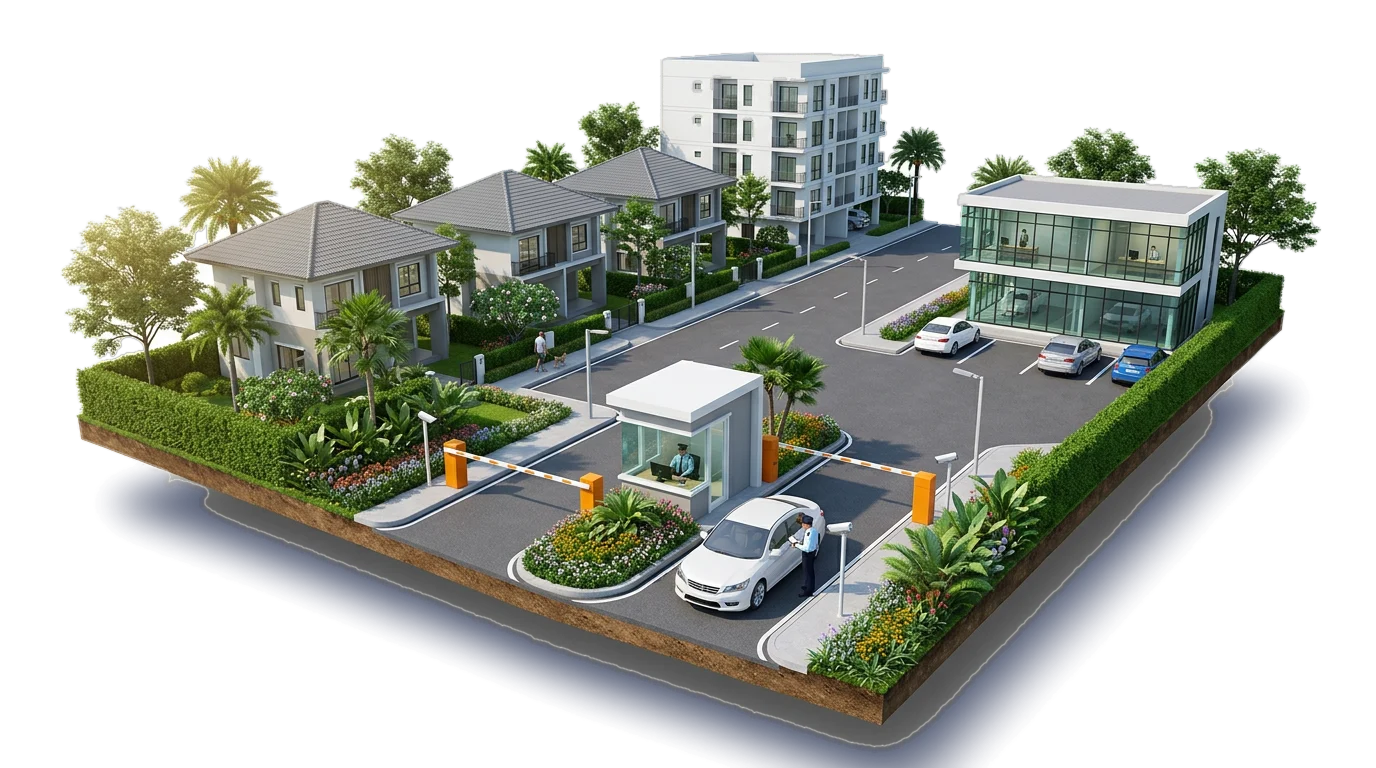
All data here is test data.

Which cars the barrier opens for on its own

  • Residents' and members' cars: on the site's vehicle register and approved by the office. The camera reads the plate and the barrier opens, no remote needed.
  • Guests residents register ahead of time: the resident adds the guest in the Residence App or on LINE with a plate and a time window. The barrier knows the car before it arrives and checks the visit window.
  • Visitors who self-register and are approved: they scan a QR code, register on their phone, site staff approve, and they drive in by the plate they registered.
  • Guests of companies in a building: the tenant company registers the guest's car ahead of time from its own portal, and the barrier knows the car when the camera reads it.
  • Paid car parks: at the exit the camera reads the plate, and the barrier opens on its own for plates that have paid.
  • The Residence App, where residents pre-register a visitor before the guest's car reaches the plate-reading barrier

Cars the barrier does not open for, and hands to the guard

  • Cars nobody registered: the barrier stays down and the guard registers the driver as a visitor at the gate. The plate the camera read shows on the guard's screen, so nobody retypes it.
  • Plates the camera cannot read: rain, mud or a car stopped at an angle. The system does not open on its own, the guard types the plate and the rest carries on as normal.
  • Guests outside their visit window: the system says the car is outside the registered time and leaves the call to the guard.
  • Cars waiting for approval or suspended: a resident's new car the office has not approved yet, or a car the office has suspended, does not get the barrier opened.
  • Blacklisted plates: cars on the site's blacklist are stopped at the gate, in and out, and always need a staff member.
  • Leaving in a car the resident has locked: residents lock their own car from the Residence App, and the exit barrier will not open for it.

Residents get an alert with the reason when their own car cannot get in. Visitors who arrive by car without an appointment can register themselves by QR code, with no ID card handed to the gate.

Read more about QR visitor registration without keeping ID cards at the gate

The estate office or building team sets the barrier's rules

  • Member vehicle register: new cars wait in an approval queue, cars can be suspended, and houses and plates import from Excel.
  • Plate blacklist: add plates that are not allowed in, with a reason.
  • Residents register their own guests, so nobody has to phone the office or the gate to say a guest is coming.
  • The barrier can be opened in an emergency with a reason, kept on its own tab of the log for review.
  • Guards have their own accounts, and the site's admin decides which parts each role can open.

Every car has a history you can look up

  • Access log: plate, photo, unit, time in, time out and duration for every car, downloadable as CSV.
  • Separate tabs: emergency barrier opens and camera reads each have their own tab.
  • Reports: entries and exits, revenue and unknown plates, exported to Excel, CSV or PDF.
  • Audit log: who did what and when, including when staff opened the barrier by hand.

Which GatePass package the plate-reading barrier comes with

LPR is a GatePass module, not a separate system, so it works with the rest of the package.

GatePass Residence (Pro)

housing estates and condos. Residents' cars and registered guests pass the barrier on their own. You can start with one handheld and add cameras later.

GatePass Building

offices, malls and mixed-use sites. Tenant companies register guests' cars ahead of time, and unregistered cars take a parking ticket at the lane screen.

GatePass Pay Park

paid car parks with nobody on duty. Cameras read plates at entry and exit, and the barrier opens on its own for plates that have paid.

See GatePass Residence for housing estates and condos

See GatePass Pay Park for paid car parks

Plate-reading cameras and barriers: how much of your equipment you can keep

  • Cameras: ZKTeco plate-reading cameras work today. Other brands and models are assessed at the site survey.
  • Barriers: an existing barrier can usually be reused through a relay.
  • Lanes: the Residence Pro package starts with cameras on 2 lanes, and you can add more.
  • Where it runs: in the cloud, on an on-site box, or both.
  • Existing data: import houses and vehicle plates from Excel.

Every project starts with a site survey to confirm which cameras and barriers can be reused and what needs adding.

Questions to ask before choosing a plate-reading barrier system

  • Does the system decide from your site's rules, or only match a plate list stored in the camera?
  • What happens when a plate cannot be read, a car is unknown or a plate is blacklisted, and who decides?
  • Can residents or tenant companies pre-register guests' cars themselves, and does the system check the visit window?
  • Can you look up which car came and went when, who opened the barrier by hand, and export reports?
  • How much of your existing barrier and cameras can you keep?
  • Does the quote separate the system, cameras, barriers and installation?

Pricing

Cost depends on the package, the number of camera lanes and the parts you switch on. The GatePass page has an estimated monthly rent, which does not include cameras, barriers, other equipment, installation or VAT. The actual price is in the quotation after the site survey.

See the estimated rent

Frequently asked questions

What does the GatePass plate-reading barrier system do?

It takes the plate the camera reads and checks it against the site's records. Residents' or members' cars on the vehicle register, and guests registered ahead of time within their visit window, get the barrier opened. Unknown cars, unreadable plates and blacklisted plates go to the guard. On the way out it checks again, including cars a resident has locked, and every car is logged for later lookup and reports.

Can we keep our existing barrier and cameras?

An existing barrier can usually be reused through a relay. ZKTeco plate-reading cameras work today, and other brands and the rest of your equipment are assessed at the site survey. It runs in the cloud, on an on-site box, or both.

What if the camera cannot read a plate?

The system does not open the barrier on its own. Whether it is rain, mud or a car stopped at an angle, the guard types the plate and the rest carries on as normal.

Can a guest's car get in if nobody registered it?

Yes, but the barrier will not open on its own. The guard registers the driver as a visitor at the gate, or the guest scans a QR code, registers on their phone and waits for site staff to approve. To have the barrier open on its own, the resident or the company being visited registers the car ahead of time with a time window.

Can we keep certain cars out?

Yes. The office adds the plate to the blacklist with a reason. Blacklisted cars are stopped at the gate in both directions and always need a staff member, and the office can also suspend a resident's car on its own.

How much does GatePass LPR cost?

It depends on the package, the number of camera lanes and the parts you switch on. The GatePass page shows an estimated monthly rent for the package you choose, not including cameras, barriers, other equipment, installation or VAT. The actual price is in the quotation after the site survey.

Want to know whether your barrier works with GatePass?

Tell us how your gate opens today, whether by remote, by card or with cameras and a barrier you already have, and which cars you want to pass on their own. We will tell you which package is closest, what you can keep, and confirm it at the site survey. If you would like to see it first, get in touch and ask for a demo.

Reachable 24 hours by phone and LINE - free site survey